Runewrd Labs · agentic endpoint security

Let your agents work. Ward off the risks.

Rune Guard, from Runeward Labs, finds the AI agents on your laptops and can block risky actions.

Protected

Recent activity

  1. Claude Codeedit src/billing/retry.tsQueued
  2. Gemini CLIrequested a Keychain itemObservedobserved; no prevention claim
  3. Windsurfprompt held a provider tokenBlockedharness hook enforced

Gurd Console

See every agent. Prove what happened.

Device health, evidence, agent risk, step-by-step sessions and team response, in one Console.

Every device at a glance

Device health that never guesses.

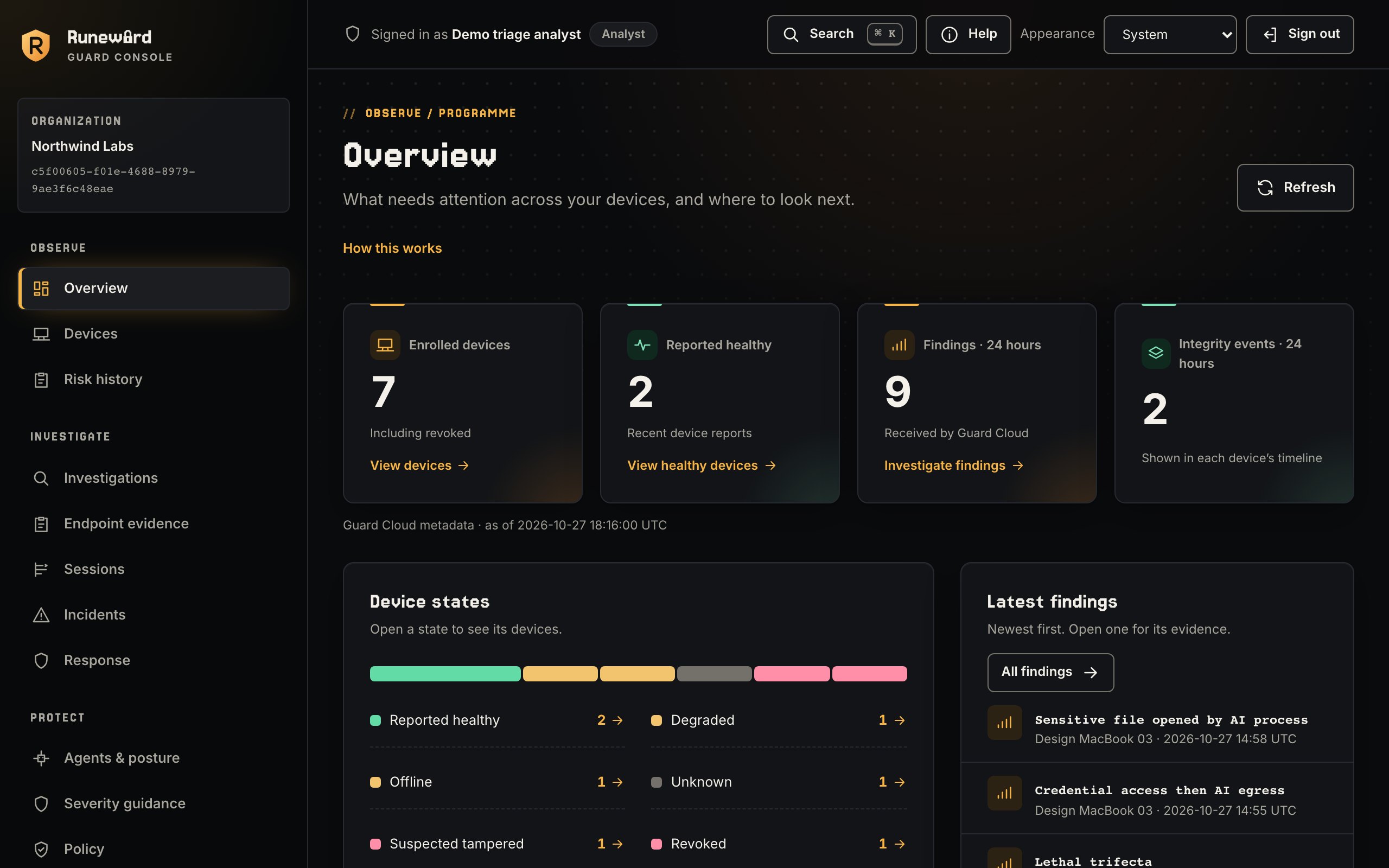
Enrolled devices, their health and the latest findings.

  • Unreported devices never count as healthy
  • Newest findings and outcomes
Guard Console overview: enrolled devices, reported health, findings and integrity events, a device-state bar and the latest findings.

Works with the agents your developers already use

Coding agents Guard

  • Claude Code
  • Codex
  • Cursor
  • GitHub Copilot CLI
  • Gemini CLI
  • Windsurf
  • Cline
  • Google Antigravity CLI
  • Kimi Code
  • Qwen Code

Browser AI and MCP Guard

  • ChatGPT in Chrome
  • Claude in Chrome
  • MCP servers

Agent frameworks Rune Box add-on

  • LangChain
  • CrewAI
  • LlamaIndex
  • OpenAI Agents
  • Strands
  • Vercel AI SDK

The problem

Agents got shell access. Security got a spreadsheet.

  1. They run where you can’t see.

    Coding agents, browser AI and MCP servers install per developer and per laptop, usually without a ticket.

  2. They act faster than review.

    One prompt can read a credential, call an API and push code before anyone looks.

  3. Logs aren’t evidence.

    After an incident you must show what was observed, what was decided and what was actually stopped.

Rune Gurd

One endpoint agent. Every AI tool on the laptop.

Endpoint · core product

Rune Gurd

See which AI tools run on each laptop and what they do with credentials, secrets and screenshots, then enforce policy through the harnesses your developers already use.

  • AI tool and MCP server inventory, including tools nobody approved
  • Findings when agents open credential files, request the Keychain or capture the screen
  • Hooks for ten coding agents that deny credential reads and, with the human-to-AI sharing opt-in, block prompts that carry secrets, where the harness allows
  • Pinned MCP tool definitions, with added, removed or changed tools reported
  • A Console with device health, findings, device evidence timelines and incidents
Add-on · execution

Rune Box

For agents in CI and automation: an open-source harness that checks each tool call against policy in an isolated environment.

  • Allow, deny or require approval before execution
  • Signed, hash-chained audit trail

Evidence, not alerts

Every finding, explained as a chain.

Guard links what an agent did into one finding, from laptop to outcome.

  1. Example data only. The Guard sensor runs on the device and watches the whole chain.
  2. The coding agent can be any of Claude Code, Codex, Cursor, Gemini CLI, GitHub Copilot, Windsurf.
  3. Device runs on a coding agent.
  4. a coding agent spawned Child process.
  5. a coding agent loads MCP server.
  6. a coding agent hook event Prompt hook.
  7. Child process opened Credential file.
  8. Child process connected to AI provider API.
  9. MCP server description changed MCP tool.
  10. Prompt hook blocked (reported) Secret pattern.
  11. Credential file: Guard recorded · path hashed.
  12. AI provider API: Guard finding · credential read → AI upload.
  13. MCP tool: Guard flagged · changed since approval.
  14. Secret pattern: Guard blocked · via the agent’s hook.
  15. Guard finding: dev-laptop-17, a coding agent, credential read → AI upload; evidence: process chain, hashes only; outcome: Observed.
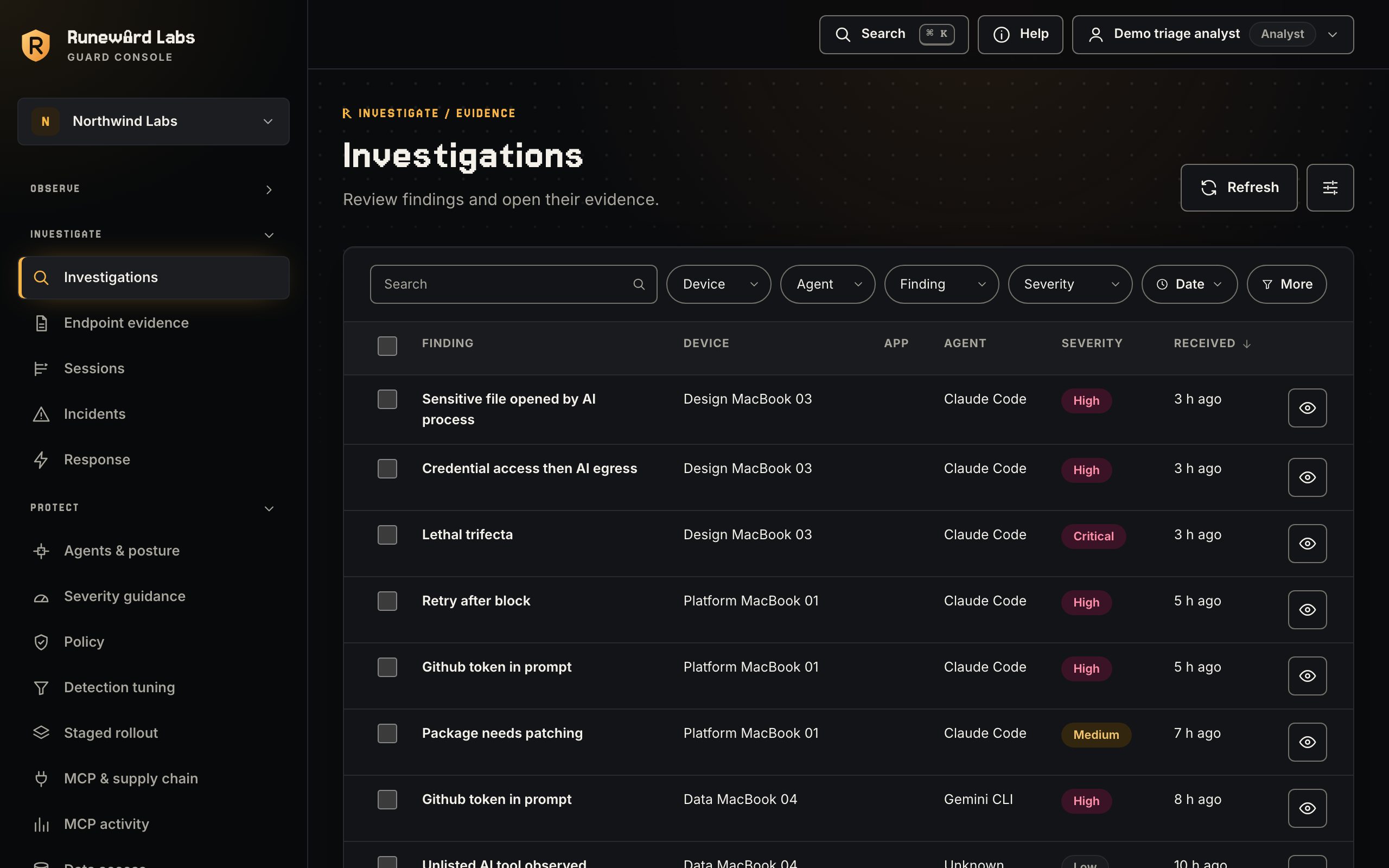
Rune Guard Console investigations: findings with device, agent, finding, severity and date filters.

Evidence you can defend

Findings that say exactly what happened.

  • Metadata by default

    Guard hashes file paths. Content needs an opt-in.

  • Observed ≠ prevented

    Each finding says what happened and whether it was stopped.

  • Evidence on every link

    Each finding shows where it came from and when.

  • Runs where you do

    Use our hosting or run Guard Cloud yourself.

The platform

One lifecycle, from discovery to better policy.

Each stage names the capability behind it.

  1. Discover

    Find the AI tools, harnesses and MCP servers on your endpoints, sanctioned or not.

  2. Assess

    See risky configuration before it becomes an incident.

  3. Govern

    Decide what agents may do, with humans in the loop where it matters.

  4. Enforce

    Stop the risky action and let the developer keep working.

  5. Investigate

    Follow the evidence with source, timing and outcome stated plainly.

  6. Improve

    Turn real evidence into tighter policy.

See what Guard covers at each stage

Add-on · Rune Box

Agents in automation too? Govern them with one command.

The open-source Rune Box quickstart creates a policy, proves a destructive command is denied before execution, and verifies the signed audit trail.

# macOS or Linux, with Docker, OrbStack or Podman running
brew install Runeeward/tap/runebox
runebox quickstart
runebox evidence export quickstart -o run.json
runebox evidence verify run.json

Your agents already have access. Ward off the risks.

Start with Guard Community, or run the free local scan today. Agents in automation too? Add the open-source Rune Box.